
Agent Introduction#
Data Processing Agent#
Responsible for interacting with Data-Juicer and executing actual data processing tasks. Supports automatic operator recommendation from natural language descriptions, configuration generation, and execution.
Workflow:
When a user says: “My data is saved in xxx, please clean entries with text length less than 5 and image size less than 10MB”, the Agent doesn’t blindly execute, but proceeds step by step:
Data Preview: Preview the first 5–10 data samples to confirm field names and data format—this is a crucial step to avoid configuration errors
Get signature: Call the
get_ops_signaturetool to obtain the operator’s parameter signatures and brief descriptions.Parameter Decision: LLM autonomously decides global parameters (such as dataset_path, export_path) and specific operator configurations
Configuration Generation: Generate standard YAML configuration files
Execute Processing: Call the
dj-processcommand to execute actual processing
The entire process is both automated and explainable. Users can intervene at any stage to ensure results meet expectations.
Typical Use Cases:
Data Cleaning: Deduplication, removal of low-quality samples, format standardization
Multimodal Processing: Process text, image, and video data simultaneously
Batch Conversion: Format conversion, data augmentation, feature extraction
View Complete Example Log (from AgentScope Studio)
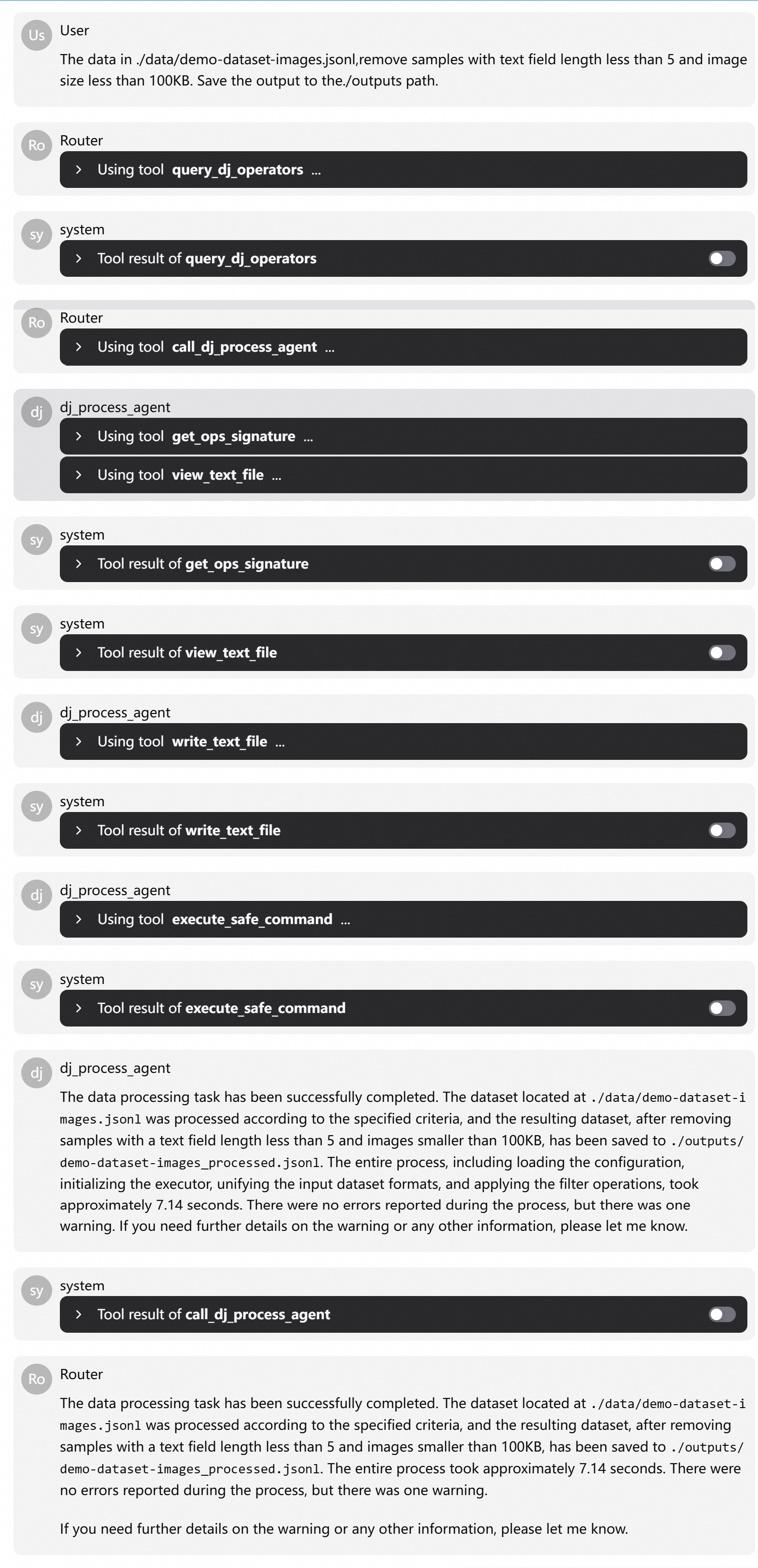
Example Execution Flow:
User input: “The data in ./data/demo-dataset-images.jsonl, remove samples with text field length less than 5 and image size less than 100Kb…”
Routing: Call query_dj_operators to precisely return two operators: text_length_filter and image_size_filter.
Data Processing Agent Execution Steps:
Call
get_ops_signatureto retrieve the parameter signatures oftext_length_filterandimage_size_filter.Use
view_text_filetool to preview raw data, confirming fields are indeed ‘text’ and ‘image’Generate YAML configuration and save to temporary path via
write_text_fileCall
execute_safe_commandto executedj-process, returning result path
The entire process requires no manual intervention, but every step is traceable and verifiable. This is exactly the “automated but not out of control” data processing experience we pursue.
Code Development Agent (DJ Dev Agent)#
When built-in operators cannot meet requirements, the traditional approach is: check documentation, copy code, adjust parameters, write tests—this process can take hours.
The goal of Operator Development Agent is to compress this process to minutes while ensuring code quality. Powered by the qwen3-coder-480b-a35b-instruct model by default.
Workflow:
When a user requests: “Help me create an operator that reverses word order and generate unit test files”, the Router routes it to DJ Dev Agent.
The Agent’s execution process consists of four steps:
Get Reference Operators: Search for existing operators with similar functionality as references.
Get Templates: Pull base class files and typical examples to ensure consistent code style
Generate Code: Based on the function prototype provided by the user, generate operator classes compliant with DataJuicer specifications
Local Integration: Register the new operator to the user-specified local codebase path
The entire process transforms vague requirements into runnable, testable, and reusable modules.
Generated Content:
Implement Operator: Create operator class file, inherit from Mapper/Filter base class, register using
@OPERATORS.register_moduledecoratorUpdate Registration: Modify
__init__.py, add new class to__all__listWrite Tests: Generate unit tests covering multiple scenarios, including edge cases, ensuring robustness
Typical Use Cases:
Develop domain-specific filter or transformation operators
Integrate proprietary data processing logic
Extend Data-Juicer capabilities for specific scenarios
View Complete Example Log (from AgentScope Studio)
